Sponsored Links

Showing posts with label tips and tricks. Show all posts

December 6, 2020

How to be safe from Phishing

One of the most common ways of hacking and retrieving user information is Phishing. It is a cybercrime in which the scammers target users through emails, text messages, fake social media posts using some brand names posing as a legitimate institute to lure the users with lucrative offers to get the personal information which may result in identity theft or financial loss.

Today almost all people in the world have access to the internet. People will have emails, social media accounts, online banking account, etc which contain their personal information, banking details, etc. The only way to access them is a password. So your password must be strong enough to protect your digital information. But only this is not enough. Scammers can use different ways to get your password and use it for their benefit. So one golden rule is never ever to give your password to anyone. Use your password only on the official website where it is used. So let's see how can scammers use phishing to get your information.


December 29, 2017

How to Find any Wi-Fi Password on Windows

Sometimes you may forget the wifi password of your network you are connected or it may be difficult to remember password. So here is the simple command line trick to find out the password. Follow these steps if you’re using Windows 7,8 or 10.

  • Open CMD as an administrator.
  • Paste the following code:
  • netsh wlan show profiles
    You will get a list of the networks that are known to your computer.
  • Now paste the following code. Replace "profilename" with the network name.
  • netsh wlan show profile name=profilename key=clear
    Look for the "Content Key". That is your password.

December 9, 2017

How to clean your Windows Temp folder

The temp folder contains files that are only needed temporally. Unfortunately, these files that are meant to be deleted don't always get deleted after their job is done, resulting in wasted drive space.

To open the temp folder, click Start or go to the Windows 8 Search, type %temp%, and select the folder that appears first. Once the folder is opened, you can manually delete files and folders. But you probably can't delete all of them. Windows won't let you do away with those currently in use. That's fine. You don't want to delete those ones anyway.

In fact, you really don't want to delete any files created since the last time you booted your PC. So if you shut down Windows every night (and I mean shut it down, not sleep or hibernate), and boot clean every morning, you can safely delete any files in Temp not dated today. You can easily do it in an old-fashioned way, DOS-style batch file to automatically clean out the folder every time you boot. Here's the process:

Open Notepad, and type these two lines:

    rd %temp% /s /q
    md %temp%

Save the file as %appdata%\microsoft\windows\start menu\programs\startup\cleantemp.bat. This will create the batch file, cleantemp.bat, inside your Start menu's Startup submenu. Everything in that menu loads automatically when you boot. Windows 8 doesn't have a Start menu. But it still has the folder. And the trick still works.

Enjoy!!!

December 5, 2017

Cool jQuery Tricks

Some of cool jQuery functions usage:
1. To add bounce animation to any element:
 $(elem).addClass("animate bounce");

2. To add shake animation to any element:
 $(elem).addClass("animate shake");

3. To disable buttons or any control elements:
$(elem).prop("disabled", true);
You can also use attr() function, but attr() is deprecated. So use prop().

Cool JavaScript Tricks

Today I would like to mention some of the JavaScript tricks that many JavaScript programmers do not know. They are cool to have in our code, but some are not practiced in real world. Here are few of them.
  1. Use of .call() function:
    If you want to iterate over the properties of object.
    var listitems = document.querySelectorAll('li'); 
    [].forEach.call(items, function(item) {
    //your code here
    })
    
    Above code does the same as the code below
    for (i = 0; i < items.length; i++) {
    var item= items[i];
    // your code here
    }
    Reversing a string:
    var js = 'hello javascript';
    var sj = [].reverse.call(hey.split('')).join(''); // "tpircsavaj olleh"
    console.log(sj);
  2. Always use var while declaring variable for the first time.
  3. Use === instead of == .
  4. undefined, null, 0, false, "", NaN are all false values.
  5. Use semicolon (;) for line termination.
  6. Get random item in an array.
    var items = [12, 548 , 'a' , 2 , 5478 , 'foo' , 8852, , 'Doe' , 2145 , 119];
    var random = items[Math.floor(Math.random() * items.length)];
    
  7. Verify that the given argument is number
    function isNumber(n){
        return !isNaN(parseFloat(n)) && isFinite(n);
    }

November 14, 2017

10 Ways to Become a Better Developer

  1. Read other people's code.
  2. Get someone to read your code.
  3. Fix bugs before writing new code.
  4. Learn a new technology.
  5. Keep it simple.
  6. Write a blog post about your code.
  7. Contribute to open source.
  8. Fix it, Don't hack it.
  9. Increase code coverage by 1%.
  10. Leave your desk every hour.

September 26, 2017

Cool Google Tricks

Google is one of the most commonly used search engine. Google is the Proclaimed king among all search engines present on the internet. Among all the web based search engines, Google stands out because of its high speed and simplicity. Even if people are used to google very few know about some very handy Google tricks that come along with this impeccable search engine. Below are some Cool Google Tricks that I have Collected. Enjoy !!!

1. Calculator

You can use the Google search engine as a real time calculator as well. For instance, if you will type 20*2 in the search box, 40 will get displayed. You can perform basic arithmetic calculation with this trick. If you are using chrome browser then typing in the url bar will work as google search.

2. Term Definition

You can now get the definition of any technical terms from simple google search. There is no longer the need to type a word and then visit dictionaries online to find its meaning. Using this trick, all you need to do is simply write "define" followed by the word whose meaning you want to know. This Cool Google tricks come very handy if you use it effectively. You can get meaning along with its synonym and antonym of the term.

September 24, 2017

Interesting Computer Facts

Check out interesting facts about technology.
While dealing with technology, you may confront with many computer tweaks and realize interesting computer facts. Here I have listed some of the top interesting computer facts. I will update it time and again with new discoveries. So do not forget to check it.
  1. Over 6,000 new computer viruses are released every month.
  2. 20% of online viruses are released by organized crime units.
  3. The first computer mouse, constructed in 1964, was made out of wood.(by Doug Engelbart)
  4. The first electro-mechanical computer was developed in 1939.
  5. The engineers who developed the IBM PC were known as “The Dirty Dozen”
  6. The average human being blinks 20 times a minute – but only 7 times a minute when using a computer.
  7. By the end of 2012 there will be 17 billion devices connected to the internet.
  8. 5 out of every 6 internet pages are porn related.
  9. Over 1 million domain names are registered every month.
  10. With it’s 800 million interent users, Facebook would be the third largest country in the World.
  11. The first hard drive was created in 1979 and could hold 5MB of data.
  12. The nVidia GeForce 6800 Ultra video card contains 222 million transistors.


How to choose the right laptop for programming

For the best result in the programming one must be very careful while choosing right laptop. Choosing the right laptop for programming can be a tough job. So you must have proper research on this matter. It’s easy to get confused while researching the various options. There are many different laptop models out there, each with a different set of trade-offs.


You can write code on most laptops. Yet, your productivity will improve if you use a machine suited to the type of tasks that you perform. There are different types of development, and various tools are required with each specialization. So, there is no one-size-fits-all approach to buying a development machine.
Hence, I made the following assumptions in this article:
  1. You are a web developer.
  2. Your laptop is your primary development machine.
Here are some considerations before purchasing your next laptop.

Mobility

Laptops come in all shapes and sizes. You need to figure out how portable you want your laptop to be. If you do not need to carry your laptop around often, you might want to consider a 15'' laptop. These will usually have better specs and more screen estate for multitasking. If you work in different locations or travel a lot, a 13-14'' laptop may be best for you. They are lighter and provide longer battery life. Unless you’re buying a 2-in-1 laptop, a touchscreen does not provide enough benefits to justify the extra cost. I’d suggest you avoid the touchscreen.

September 16, 2017

Combine two videos using VLC media player

VLC media player is best known as a video player but it has other many advantages also as a video editing software which includes merging or combining multiple videos into single video. So today lets talk about how we can merge two videos into single video using VLC media player.

Before starting, we will need two video clips with the identical encoding or video format. If the videos are not of identical format, then VLC also provides another features of converting video of one format to another. We can use it to transcoding the files if they are not of same format.

GOTS07E06

December 30, 2014

How to disable autorun

One of the main reason of getting affected by the computer virus is due to the autorun executed while using flash drive/ pen drive or CD in the computer. Autorun is enabled by default in the computer. Here i am going to give some steps to disable the autorun in your computer.
  1. Goto Start > Run > Type regedit > Enter.
  2. Goto the location HKEY_CURRENT_USER\Software\Microsoft\Windows\CurrentVersion\Explorer\AutoplayHandlers.
  3. Now double click the diaable autoplay.
  4. In the vlaue data enter FF for hexadecimal or 225 for decimal.
  5. Now press OK and exit the registry editor.
  6. Restart the computer and you are done.

December 26, 2014

Most common computer problems and solutions

Hello everyone, today i am going to write about some of the common problems in the windows computer that you may or had encountered with and their solutions as well. I hope you will like this. So here are the problems and solutions.

Problem 1: Hiddens files or folders arenot shown.

Sometimes due to some virus effects or some bad scripts, the files or folders that you make hidden are not shown even if you do "show hidden files" by folder options.

Solution:

  1. Go to Start > Run > Type Regedit > Enter.
  2. Then goto the location >>HKEY_LOCAL_MACHINE\SOFTWARE\Microsoft\Windows\CurrentVersion\Explorer\Advanced\Folder\Hidden\NOHIDDEN
  3. Double click the CheckedValue.
  4. Then insert 1 in the value data.
  5. You are done. Enjoy!!!

December 24, 2014

How to get free Payoneer Master Card

Payoneer is an Internet-based financial services business that allows users to transfer money and receive payments through re-loadable prepaid MasterCard debit cards. Payoneer is a registered Member Service Provider of MasterCard worldwide. Payoneer provides its user with the mastercard in free of cost. And later the master card can be loaded with online money for transactions.
Here i am going to show the process to apply for the payoneer master card which is free of cost.
  1. First of all click Register Payoneer.
  2. You will be then redirected to the payoneer sign up page in new tab.

December 19, 2014

Unix/Linux Cheat Sheet

File System


Lock files and folder without any app

There is always a necessity to lock the files and folders so that any other users cannot access them. You can hide those files and folders or make them unaccessible to other users using various softwares like PC Security, folder locker etc. But here i am going to show some of the steps from which you can make the files and folders unaccessible to other. Ok lets start:
  1. Go to folder of file you want to lock.
  2. Right click in it and go to properties.
  3. Go to security Tab.
  4. In security tab Go to Edit tab.
  5. In security window select Group or username.
  6. Click on deny checkbox.
  7. Click apply and click Ok.

Increase pendrive data transfer rate

Data transfer Rate means how much data can be transfered from Your USB to computer or computer to USB per second. If you are tired of the low data transfer rate in your pendrive then you can follow the tips given below:
  1. On windows explorer, Go to removable drives and select format By right clicking Your desired Drive.
  2. Change the Filesystem of USB to NTFS.
  3. Uncheck Quick Format and press start.
  4. Again right click the pendrive and click properties.

Make your computer fast

Everyone wants to make their computer fast in performance and execution. But due to some unknown problems the computer runs slow making the user irritated. Some here i am going to point out some of the tips for making the computer fast.

December 6, 2014

Utilize your leisure time visiting best sites

I suggest don't misuse your spare time on useless things and activities. There are some of the useful and best sites available where you can utilize your time visiting them in your leisure time. You will feel great anyway once you are used to them.
  1. Hubpages
  2. Wikihow
  3. Explainthatstuff
  4. Fmylife
  5. About
  6. Banoosh
  7. Reddit
  8. Experienceproject
  9. Howtostudy

November 9, 2014

Earn online without investment

Making money online at home or any other place is simple and easy as you get through it. Many people think of earning money online but they cannot get idea from where to start or how to start. I am sure that this site will give you the full information about earning money online. There are various methods of working online. Some are click on the ads, take survey, data entry, blogs, adsense and many more. I will describe all of them very simply to make every one understand.

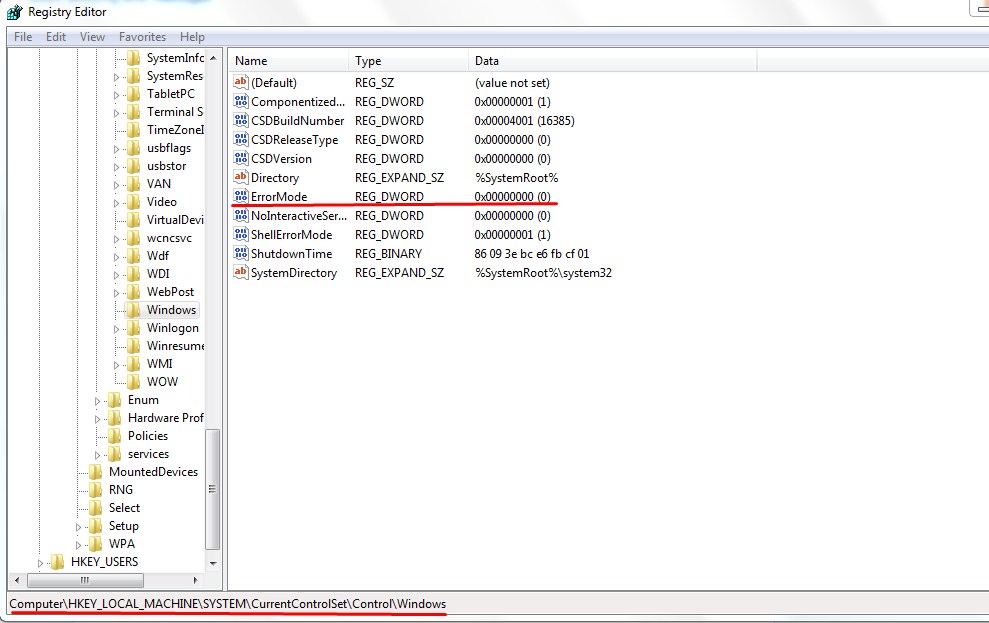
Block annoying error messages

Error messages in computer windows is required as it helps us to give information about the errors in our computer. But sometimes these error messages are so annoying that it appears almost every times. So we wish to block these error messages to get rid of it. So today i am going to share the way to block the error messages with you guys. Just follow these simple steps.

  • Press windows+R key to open the run command box.
  • Type regedit and press enter. 
  • Go to HKEY_LOCAL_MACHINE/ SYSTEM / CURRENT CONTROLSET / CONTROL / WINDOWS .