Sponsored Links

Showing posts with label computer. Show all posts

December 29, 2017

How to Find any Wi-Fi Password on Windows

Sometimes you may forget the wifi password of your network you are connected or it may be difficult to remember password. So here is the simple command line trick to find out the password. Follow these steps if you’re using Windows 7,8 or 10.

  • Open CMD as an administrator.
  • Paste the following code:
  • netsh wlan show profiles
    You will get a list of the networks that are known to your computer.
  • Now paste the following code. Replace "profilename" with the network name.
  • netsh wlan show profile name=profilename key=clear
    Look for the "Content Key". That is your password.

November 14, 2017

Future For Computer Geeks

This generation that we are living is the computer age. Everything in this today's world are somehow connected to the computer and the technology. Alright lets just talk about the computer. For those who want their future in the computer may be for engineers, programmers, designers and so on they have a very bright future if only they can struggle. Many people in this field have earned much more wealth and this is just in increasing trend. So in this blog i am writing about everything for a computer geek. If you are also a beginner in this field then every post are equally important. I will post the tutorials, codes, important steps and many more here. What you mist do is stay tuned.

We will soon meet in next post.


September 24, 2017

Facts about Technology that will amuse you

We are bound with the revolution of technology today. There is always something new being presented to human beings when it comes to technology, and we never cease to become bored of it. There are plenty of things about technology that would interest you or amuse you. I have collected some of the interesting facts about technology today that will amase you for sure. Check out the amazing facts here:

  1. The majority of computer users blink 7 times per minute at most, compared to the normal blink rate of 20 blinks per minute.
  2. Email was invented before the web; which means that it has been around longer.
  3. The home of Bill Gates was designed with the use of a Macintosh Computer.
  4. The original Macintosh case which was created during the year of 1982, contains 47 signatures of the division of Apple’s Macintosh members.
  5. Doug Engelhard invented the very first computer mouse which was made out of wood. He created it in 1964.
  6. On a regular work day for a typist, their fingers travel at an average rate of about 12.6 miles per day.
  7. The state of Alaska is the only state whose letters can be typed in a straight row of keyboard letters.
  8. Ebay has about $680 worth of transactions that take place per second.
  9. There are more than one million domain names that are registered online per month.
  10. Apple, Microsoft, HP, and Google are all IT applications that started development in a garage.
  11. The social Media website Myspace has about 110 million registered users. If the social media site had been considered a country it would be the 10th largest; right after Mexico.
  12. Youtube.com was registered February 14th, 2005.
  13. The Dvorak keyboard is known to be more efficient and 20 times faster than Qwerty.
  14. Computer programming is an occupation that is growing faster than any other.
  15. The first online advertisement banner was created and used in the year of 1994.
  16. Hewlett Packard, which is more known as HP, was invented in a garage in Palo Alto during the year of 1939.
  17. As of this year, there are currently 17 billion devices that are connected or related to the internet and the use of the internet.
  18. About 1 out of 8 couples met their spouse on the internet within the past few years. There are more people meeting their significant others online each year.
  19. If you are able to find a way to hack into Facebook then they will pay you up to $500.
  20. There are about 1 billion instant messenger accounts that are active around the world today
The above are 20 interesting facts about technology that you may or may not have been aware of. Now that you know that you can share these facts with other people who might not know about them. It is most certainly considered to be entertainment for your brain. You can also check some interesting facts about computer here.

Interesting Computer Facts

Check out interesting facts about technology.
While dealing with technology, you may confront with many computer tweaks and realize interesting computer facts. Here I have listed some of the top interesting computer facts. I will update it time and again with new discoveries. So do not forget to check it.
  1. Over 6,000 new computer viruses are released every month.
  2. 20% of online viruses are released by organized crime units.
  3. The first computer mouse, constructed in 1964, was made out of wood.(by Doug Engelbart)
  4. The first electro-mechanical computer was developed in 1939.
  5. The engineers who developed the IBM PC were known as “The Dirty Dozen”
  6. The average human being blinks 20 times a minute – but only 7 times a minute when using a computer.
  7. By the end of 2012 there will be 17 billion devices connected to the internet.
  8. 5 out of every 6 internet pages are porn related.
  9. Over 1 million domain names are registered every month.
  10. With it’s 800 million interent users, Facebook would be the third largest country in the World.
  11. The first hard drive was created in 1979 and could hold 5MB of data.
  12. The nVidia GeForce 6800 Ultra video card contains 222 million transistors.


How to choose the right laptop for programming

For the best result in the programming one must be very careful while choosing right laptop. Choosing the right laptop for programming can be a tough job. So you must have proper research on this matter. It’s easy to get confused while researching the various options. There are many different laptop models out there, each with a different set of trade-offs.


You can write code on most laptops. Yet, your productivity will improve if you use a machine suited to the type of tasks that you perform. There are different types of development, and various tools are required with each specialization. So, there is no one-size-fits-all approach to buying a development machine.
Hence, I made the following assumptions in this article:
  1. You are a web developer.
  2. Your laptop is your primary development machine.
Here are some considerations before purchasing your next laptop.

Mobility

Laptops come in all shapes and sizes. You need to figure out how portable you want your laptop to be. If you do not need to carry your laptop around often, you might want to consider a 15'' laptop. These will usually have better specs and more screen estate for multitasking. If you work in different locations or travel a lot, a 13-14'' laptop may be best for you. They are lighter and provide longer battery life. Unless you’re buying a 2-in-1 laptop, a touchscreen does not provide enough benefits to justify the extra cost. I’d suggest you avoid the touchscreen.

December 26, 2014

Most common computer problems and solutions

Hello everyone, today i am going to write about some of the common problems in the windows computer that you may or had encountered with and their solutions as well. I hope you will like this. So here are the problems and solutions.

Problem 1: Hiddens files or folders arenot shown.

Sometimes due to some virus effects or some bad scripts, the files or folders that you make hidden are not shown even if you do "show hidden files" by folder options.

Solution:

  1. Go to Start > Run > Type Regedit > Enter.
  2. Then goto the location >>HKEY_LOCAL_MACHINE\SOFTWARE\Microsoft\Windows\CurrentVersion\Explorer\Advanced\Folder\Hidden\NOHIDDEN
  3. Double click the CheckedValue.
  4. Then insert 1 in the value data.
  5. You are done. Enjoy!!!

December 19, 2014

Lock files and folder without any app

There is always a necessity to lock the files and folders so that any other users cannot access them. You can hide those files and folders or make them unaccessible to other users using various softwares like PC Security, folder locker etc. But here i am going to show some of the steps from which you can make the files and folders unaccessible to other. Ok lets start:
  1. Go to folder of file you want to lock.
  2. Right click in it and go to properties.
  3. Go to security Tab.
  4. In security tab Go to Edit tab.
  5. In security window select Group or username.
  6. Click on deny checkbox.
  7. Click apply and click Ok.

Increase pendrive data transfer rate

Data transfer Rate means how much data can be transfered from Your USB to computer or computer to USB per second. If you are tired of the low data transfer rate in your pendrive then you can follow the tips given below:
  1. On windows explorer, Go to removable drives and select format By right clicking Your desired Drive.
  2. Change the Filesystem of USB to NTFS.
  3. Uncheck Quick Format and press start.
  4. Again right click the pendrive and click properties.

Make your computer fast

Everyone wants to make their computer fast in performance and execution. But due to some unknown problems the computer runs slow making the user irritated. Some here i am going to point out some of the tips for making the computer fast.

December 6, 2014

Utilize your leisure time visiting best sites

I suggest don't misuse your spare time on useless things and activities. There are some of the useful and best sites available where you can utilize your time visiting them in your leisure time. You will feel great anyway once you are used to them.
  1. Hubpages
  2. Wikihow
  3. Explainthatstuff
  4. Fmylife
  5. About
  6. Banoosh
  7. Reddit
  8. Experienceproject
  9. Howtostudy

November 9, 2014

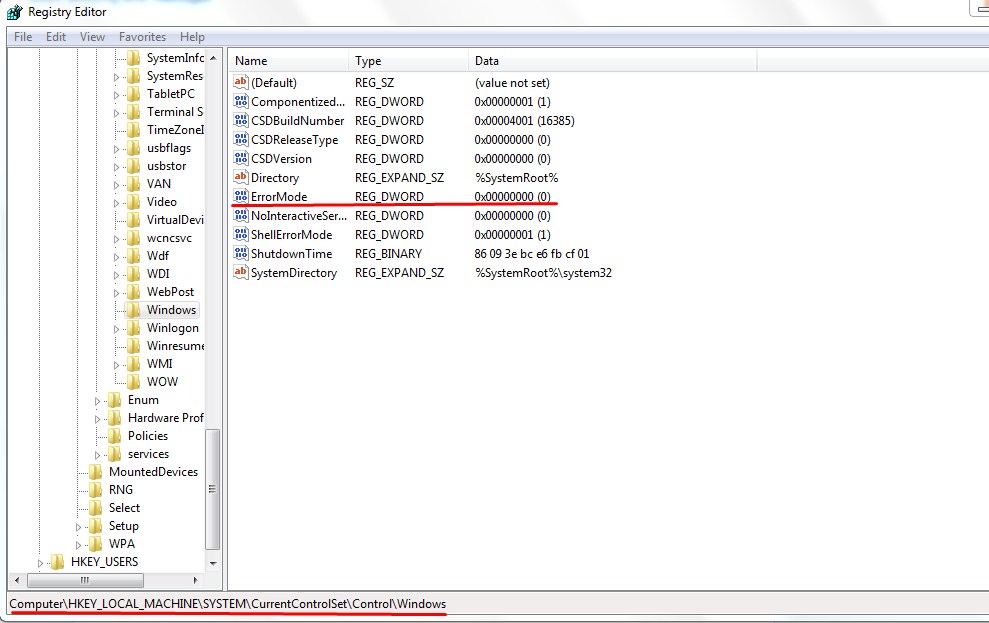
Block annoying error messages

Error messages in computer windows is required as it helps us to give information about the errors in our computer. But sometimes these error messages are so annoying that it appears almost every times. So we wish to block these error messages to get rid of it. So today i am going to share the way to block the error messages with you guys. Just follow these simple steps.

  • Press windows+R key to open the run command box.
  • Type regedit and press enter. 
  • Go to HKEY_LOCAL_MACHINE/ SYSTEM / CURRENT CONTROLSET / CONTROL / WINDOWS .

Convert videos into many formats with VLC media player

VLC media player is one of the best media player but many of you may not know that it is also a video converter. We can use it as a video converter as we can convert videos to different formats as well as audio. So today i am going to show you guys some steps for converting a video to different formats. 

  • Open VLC media player.
  • Go to Media menu and click on convert/save Option or click CTRL+R.
  • In File Tab click on Add Button and add the video which you want to convert.
  • Now click on convert/save Menu on lower right corner.

November 7, 2014

How to download youtube videos using VLC media player

In the previous post i have shown you the ways to record videos using the VLC media player. In this post i am going to show you guys how to download the youtube videos using VLC media player. When you lack any kind of downloading software, then this trick may come to handy. Here are the steps for downloading:
  • First of all open VLC media player.
  • Go to Media >>> Open Network Stream >>> Network .
  • Paste the URL of youtube video and click play.

November 6, 2014

Record Desktop Using VLC Media Player

Are you tired of searching the software to record the desktop video? If that is the case then i have brought a trick to record the desktop using the VLC media player that will help you to create tutorials. It is so simple to use and you will also feel great once you try it. Here are the steps for recording: 

  • First of all open VLC media player.
  • Go to view menu and click on advanced controls to enable record buttons.
  • Go to media menu and click open capture device or press ctrl+C. 

November 5, 2014

Write in Nepali

Roman to Unicode


Write from Virtual Keyboard

November 3, 2014

How to Boost Wi Fi Signal

Wireless Network is most common these days. Wi Fi is used extensively in many offices, colleges, and even at home. And every one has concern regarding the wifi signal to boost it for the maximum strength and coverage. So here are some of the steps to increase the wifi signal in order to run wifi in your devices in maximum strength. 

  • Turn the antennae on your router in different directions to see which way it works best. It might be helpful to have someone else use the computer while you're doing this, so s/he can point out what spot is best.
  • You can also move all electrical appliances away from your wireless router, including cordless telephones, microwaves and even televisions because they can lower the range of your router because of the wavelengths they run on.

August 31, 2014

Draw Heart Shape in Google

Draw Heart Shape in Google
This is the trick to draw a heart shape in google search result.

Remove Virus which do not show hidden folders

Remove Virus which do not show hidden folders

This is the trick to remove the virus that will hide your folders. Or simply this trick will help to unhide the folders that are made hidden due to the virus.
  1. Go to start >> Run.
  2. Enter 'regedit'.
  3. In the registry editor follow the steps >> hkey_local_machine >> software >> microsoft >> windows >> currentversion >> explorer >> advanced >> folder >> hidden >> showall.

August 28, 2014

Make Your Computer Welcome You

This trick is really cool. You can make your own audio file that will play during starting your pc. So you can make your pc welcome you.
To use this trick, follow the steps given below:
  • Open notepad first.
  • Copy and paste the exact code given below.
  • Dim speaks, speech
    speaks="Welcome to your PC Satik Pral"
    Set speech=CreateObject("sapi.spvoice")
    speech.Speak speaks
    

How to convert any text to audio file?

This tutorials will provide you the way to create a file that will convert the text into audio. Enjoy..
Step 1. First of all Open notepad then copy the below text and paste it in notepad.

Dim message, sapi
message=inputbox("What Do You Want To say?")
Set sapi=CreateObject("sapi.spvoice")
sapi.Speak message