Sponsored Links

December 21, 2014

Top 10 smartphones for 2014

Tremendous development in the technology has made a whole world shrink within a palm. Within few years there is massive progress in the production of the smartphones. Here i am presenting you with the list of top 10 best quadcore smartphones launched in 2014 AD. I have also added the picture for every smartphone. Have a look.
  1. Samsung Galaxy S4

December 19, 2014

Unix/Linux Cheat Sheet

File System


Lock files and folder without any app

There is always a necessity to lock the files and folders so that any other users cannot access them. You can hide those files and folders or make them unaccessible to other users using various softwares like PC Security, folder locker etc. But here i am going to show some of the steps from which you can make the files and folders unaccessible to other. Ok lets start:
  1. Go to folder of file you want to lock.
  2. Right click in it and go to properties.
  3. Go to security Tab.
  4. In security tab Go to Edit tab.
  5. In security window select Group or username.
  6. Click on deny checkbox.
  7. Click apply and click Ok.

Increase pendrive data transfer rate

Data transfer Rate means how much data can be transfered from Your USB to computer or computer to USB per second. If you are tired of the low data transfer rate in your pendrive then you can follow the tips given below:
  1. On windows explorer, Go to removable drives and select format By right clicking Your desired Drive.
  2. Change the Filesystem of USB to NTFS.
  3. Uncheck Quick Format and press start.
  4. Again right click the pendrive and click properties.

Make your computer fast

Everyone wants to make their computer fast in performance and execution. But due to some unknown problems the computer runs slow making the user irritated. Some here i am going to point out some of the tips for making the computer fast.

December 6, 2014

Utilize your leisure time visiting best sites

I suggest don't misuse your spare time on useless things and activities. There are some of the useful and best sites available where you can utilize your time visiting them in your leisure time. You will feel great anyway once you are used to them.
  1. Hubpages
  2. Wikihow
  3. Explainthatstuff
  4. Fmylife
  5. About
  6. Banoosh
  7. Reddit
  8. Experienceproject
  9. Howtostudy

November 9, 2014

Earn online without investment

Making money online at home or any other place is simple and easy as you get through it. Many people think of earning money online but they cannot get idea from where to start or how to start. I am sure that this site will give you the full information about earning money online. There are various methods of working online. Some are click on the ads, take survey, data entry, blogs, adsense and many more. I will describe all of them very simply to make every one understand.

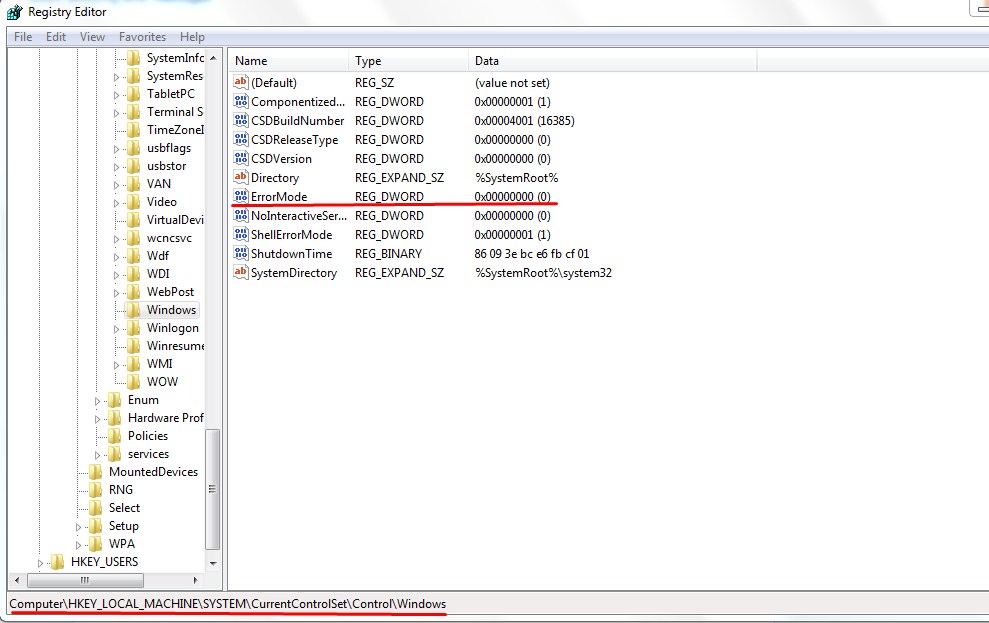
Block annoying error messages

Error messages in computer windows is required as it helps us to give information about the errors in our computer. But sometimes these error messages are so annoying that it appears almost every times. So we wish to block these error messages to get rid of it. So today i am going to share the way to block the error messages with you guys. Just follow these simple steps.

  • Press windows+R key to open the run command box.
  • Type regedit and press enter. 
  • Go to HKEY_LOCAL_MACHINE/ SYSTEM / CURRENT CONTROLSET / CONTROL / WINDOWS .

Tips to save and increase mobile battery life

Tips to save battery:

  • Use flight mode if you do not need to use networks.
  • Turn off phone’s back light.
  • Turn off vibration, it takes more power.
  • Disable unnecessary background processes. Exit the programs properly after using it.
  • Limit your talk time.
  • Use GSM/2G rather 3G. 3G eats up too much power than GSM/2G.
  • Turn off WiFi, Bluetooth, infrared when you do not need it.

Convert videos into many formats with VLC media player

VLC media player is one of the best media player but many of you may not know that it is also a video converter. We can use it as a video converter as we can convert videos to different formats as well as audio. So today i am going to show you guys some steps for converting a video to different formats. 

  • Open VLC media player.
  • Go to Media menu and click on convert/save Option or click CTRL+R.
  • In File Tab click on Add Button and add the video which you want to convert.
  • Now click on convert/save Menu on lower right corner.